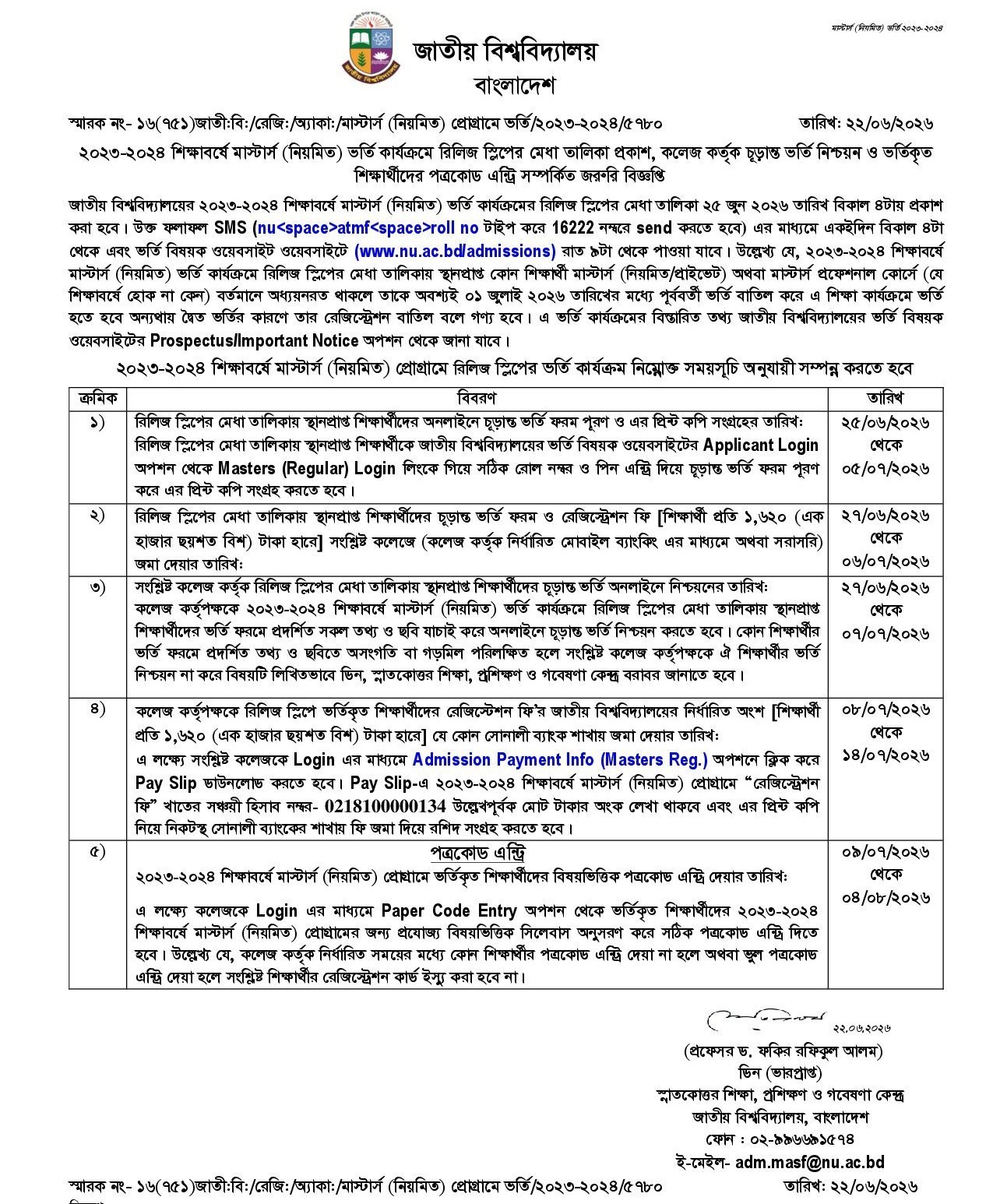
The wait is almost over. The NU Masters Release Slip Result 2026 is ready. The National University will publish it on 25 June 2026 at 4:00 PM. This result is for the Masters (Regular) program of the 2023-2024 session. If you applied through the release slip, this guide is for you. Below you will find the result date, the check process, the fees, and every important date.
Key Information at a Glance
- Result date: 25 June 2026
- SMS time: From 4:00 PM
- Online time: From 9:00 PM
- Official website: www.nu.ac.bd/admissions
- SMS format: NU ATMF [Roll Number] to 16222
- Admission fee: Tk 1,620
What Is the NU Masters Release Slip Result 2026?
The release slip is a second chance. Some students did not get a seat in the earlier merit list. Some got a seat but did not take admission. Some cancelled their admission later. The release slip helps all of these students. It gives them one more way to get a seat.
The NU Masters Release Slip Merit List 2026 shows the selected students. It is made for each college and each subject. Your name will appear if you get a seat. People also call this the Masters Final Year program.
NU Masters Release Slip Result 2026 Publish Date
The National University will publish the result on 25 June 2026. You can check it in two ways:
- By SMS from 4:00 PM on the same day.
- Online from 9:00 PM on the same day.
Keep your roll number and PIN ready. You will need them to log in.
How to Check the NU Masters Release Slip Merit List 2026
You can check your result by SMS or online. Both methods are simple. Pick the one that suits you.
Check by SMS
The SMS method works on any mobile network. Follow these steps:
- Open the message option on your phone.
- Type: NU ATMF [Your Roll Number]
- Send it to 16222.
You will get a reply SMS with your result. This service starts at 4:00 PM.
Check Online
You can also check the result on the official website. Follow these steps:
- Visit www.nu.ac.bd/admissions.
- Go to the Applicant Login option.
- Click on Masters (Regular) Login.
- Enter your correct roll number and PIN.
- Submit and view your result.
The website opens for results from 9:00 PM. The server may be slow at first. Stay calm and try again after some time.
NU Masters Release Slip Result 2026 Important Dates
Here are all the key dates in one place. Note them down so you do not miss a step.
| Step | Task | Date |
|---|---|---|
| 1 | Fill the final admission form online and print it | 25 June – 5 July 2026 |
| 2 | Pay the form and registration fee at your college | 27 June – 6 July 2026 |
| 3 | College confirms your final admission online | 27 June – 7 July 2026 |
| 4 | College deposits the NU fee at Sonali Bank | 8 July – 14 July 2026 |
| 5 | Paper code (subject code) entry by the college | 9 July – 4 August 2026 |
Final Admission Form Fill-up Process
You must fill the final admission form to confirm your seat. Here is the simple process:
- Log in at www.nu.ac.bd/admissions with your roll number and PIN.
- Open the Masters (Regular) final admission form.
- Check your name, photo, and all details with care.
- Submit the form online.
- Download and print the form on A4 paper.
- Sign the printed copy.
Then submit the printed form to your college. Take your academic documents with you.
Registration Fee and Payment
The fee is the same for every student. You pay Tk 1,620 to your college. You can pay through mobile banking or directly. Your college will tell you the exact method.
After that, the college deposits the NU part of the fee. This goes to any Sonali Bank branch. The college downloads a Pay Slip from the portal. The Pay Slip shows the savings account number 0218100000134. This step is the college’s job, not yours.
Important Warning: Avoid Dual Admission
This rule is very important. Please read it with care.
Are you already studying in any Masters course right now? This includes Masters Regular, Masters Private, or Masters Professional. If yes, you must cancel that old admission first. You have to cancel it by 1 July 2026.
If you do not cancel it, you will have two admissions at once. This is called dual admission. The university will then cancel your registration. So do not skip this step.
Paper Code Entry (Subject Code)
The paper code entry is the final step. Your college handles this part for you. The college enters the correct subject codes. It follows the right syllabus for your subject.
This step matters a lot. The college must enter the paper code on time. A wrong code or a missed code causes a big problem. In both cases, the university will not issue your registration card. So remind your college to finish this step before the deadline.
What If Your Name Is Not on the Merit List?
Do not lose hope if your name is not there. This can happen for many reasons. Keep an eye on the official website for any new notice. The university shares updates there first. You can also speak to your college admission office for help and advice.
Frequently Asked Questions (FAQ)
The result will be published on 25 June 2026. The SMS service starts at 4 PM. Online results start at 9 PM.
Type NU ATMF [Your Roll Number] and send it to 16222.
You pay Tk 1,620 to your college for the form and registration fee.
Check it at www.nu.ac.bd/admissions under the Masters (Regular) login.
You can fill and print the form from 25 June to 5 July 2026.
No. Students who get a seat through the release slip cannot change the subject.
Final Words
The NU Masters Release Slip Result 2026 is a big moment for many students. It opens a new door to higher study. Follow each date with care. Pay your fee on time. Submit your documents to your college. And always trust the official website for updates: www.nu.ac.bd/admissions.